Stop the Job Search Spiral: How to Build a Search Dashboard for Consistent Results
Outcome: By the end of this lesson, you will build a working search dashboard and run your first Sunday 15-Minute Review using the GHFE pipeline stages.
1. Introduction: From Random Activity to a Winning System
You have defined your target role, built your company list, and deciphered the internal mechanics of the hiring machine. Now, you need the operating system to run it.
Without a system, a job search inevitably follows a predictable, destructive pattern. In week one, you are fueled by adrenaline, firing off twenty applications. By week two, the silence from employers begins to drain your energy. By week four, you find yourself sitting on the couch at 2:00 PM watching TV, paralyzed by the "emotional noise" of rejection and wondering where your motivation went.
A Search Dashboard is the diagnostic tool that stops this spiral. It replaces emotional reactivity with "Hiring Machine Intelligence," transforming a vague, stressful experience into a measurable, data-driven campaign. In this system, we operate on a single architectural principle: What gets measured gets managed.
2. The 6 Stages of a Healthy Job Search Pipeline
To manage your search with technical precision, you must view it as a sales pipeline. Opportunities enter at the top as data points and move through six distinct stages. If you cannot visualize where your candidates are in this pipeline, you cannot manage your momentum.
| Stage | Description | What You're Doing |
|---|---|---|
| Researched | Identified a specific company or role. | Initial research; added to target list. |
| Connected | Established contact with an internal stakeholder. | Networking outreach; informational conversations. |
| Applied | Formally submitted your candidacy. | Tailored resume and cover letter submitted. |
| Screening | Engaged in the initial evaluation phase. | Recruiter phone screens; initial conversations. |
| Interviewing | Advanced into the formal selection process. | Multiple interview rounds; deep-dive assessments. |
| Offer | Reached the final decision and negotiation stage. | Evaluating terms; negotiating total compensation. |
3. Data-Driven Diagnostics: Using Conversion Rates to Fix Your Search
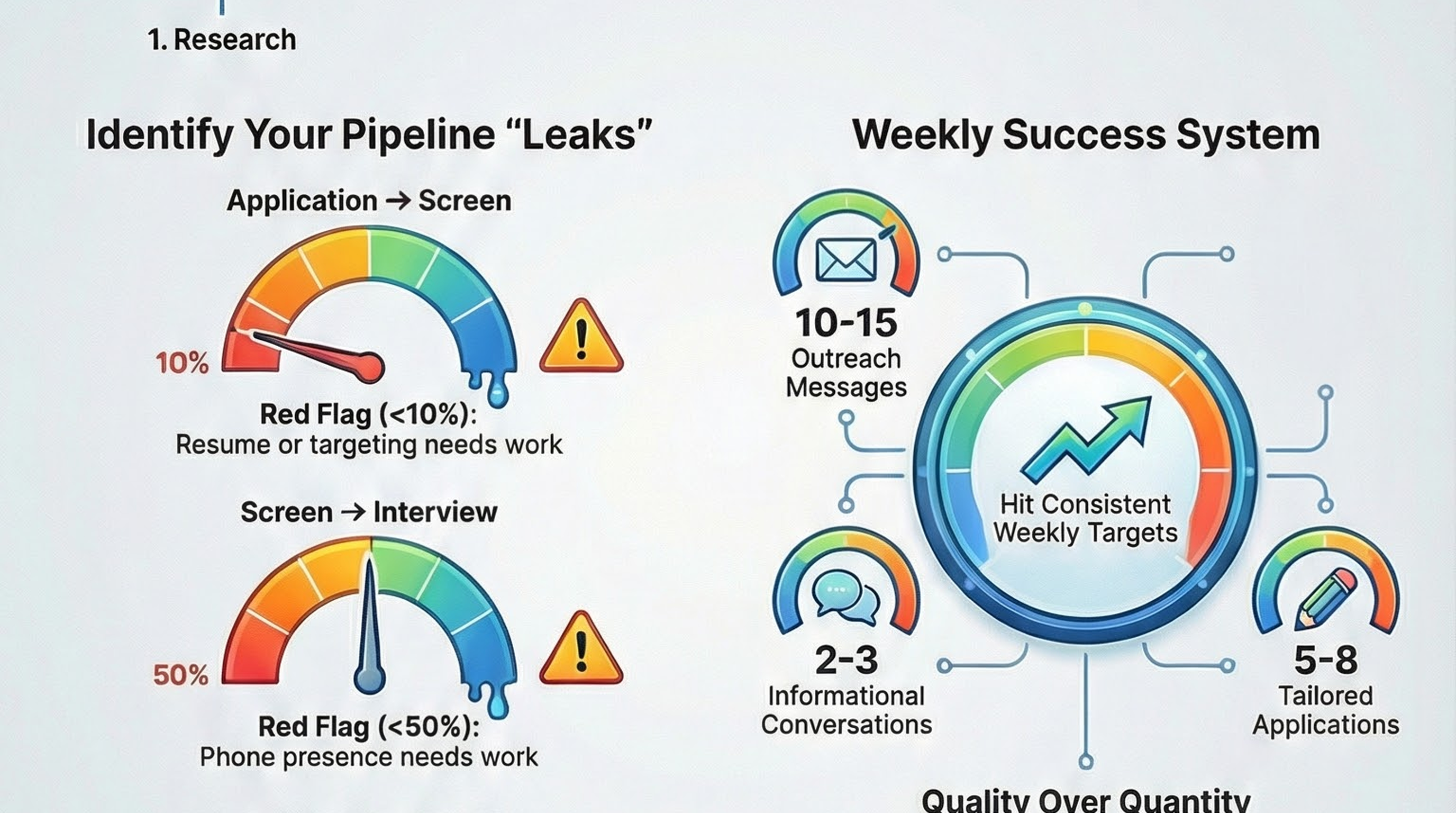
When you track the movement between pipeline stages, you generate conversion rates that act as a diagnostic health check. Without these metrics, every rejection feels like a personal failure. With them, rejections are simply data points indicating where the "system leak" is occurring.
- Application → Screen Rate
- Red Flag: Below 10%.
- System Correction: Your resume or your targeting is the failure point. You are either applying to roles that don't align with your profile or your branding materials aren't cutting through the noise.
- Screen → Interview Rate
- Red Flag: Below 50%.
- System Correction: Your phone presence or initial pitch needs calibration. You are qualified enough to get noticed, but you aren't successfully bridging the gap during the first human contact.
- Interview → Offer Rate
- Red Flag: Below 25%.
- System Correction: Your interviewing skills require a deep-dive overhaul. You are a finalist, but you are failing to demonstrate your specific value during rigorous assessments or high-stakes interviews.
4. The "Magic Numbers": Weekly Activity Targets
Consistency is the engine of a successful search. To maintain a healthy pipeline, you must hit these minimum benchmarks every week. These numbers are derived from thousands of successful searches and are designed to ensure that even if one opportunity stalls, your momentum does not.
| Activity | Weekly Target | Why it Matters |
|---|---|---|
| New Companies Researched | 5–10 | Keeps the pipeline fresh and ensures you never run out of targets. |
| Networking Outreach | 10–15 | Math: A 20–30% response rate is required to net 2–4 real conversations. |
| Informational Conversations | 2–3 | High-leverage activity; one conversation can bypass 100 applications. |
| Tailored Applications | 5–8 | Quality > Quantity. Five focused applications outperform fifty generic ones. |
| Follow-ups | 5–10 | Most people drop the ball here. This increases results with zero extra effort. |
| Skills Development | 2–3 Hours | Keeps your confidence high and your technical skills current and sharp. |
5. Designing Your Weekly Rhythm
Structure is your primary defense against decision fatigue and burnout. By following a rigid weekly rhythm, you eliminate the "What should I do today?" anxiety and move straight into execution.
- Monday: Plan
- Review your dashboard and calculate your conversion rates.
- Set specific targets and prioritize your Tier 1 (top-priority) actions.
- Tuesday: Execute (Outreach + Applications)
- High-energy phase: Send networking messages and submit tailored applications.
- Wednesday: Execute (Conversations + Interviews)
- Focus on engagement: Conduct informational conversations and formal interview rounds.
- Thursday: Execute (Applications + Follow-ups)
- Pipeline maintenance: Submit remaining applications and follow up on previous outreach.
- Friday: Reflect + Adjust
- Update the dashboard with the week’s data.
- Identify "leaks" and adjust your strategy for the following week.
- Weekend: Recharge + Light Prep
- Conduct light research on new companies to stay ahead, then rest. This is a marathon; recovery is mandatory.
6. Supercharging Your System with AI Tools
To maintain the precision of a Systems Architect without the manual overhead, integrate these automated dashboards and assistants into your workflow. Use the following specialized AI Toolkit to streamline your data management:
- Dashboard Setup Assistant (Initial configuration)
- Pipeline Analyzer (Automated diagnostic of conversion leaks)
- Weekly Review Coach (Reflection and goal-setting support)
- Search Strategy Optimizer (Iterative strategy adjustments)
- Momentum Maintainer (Burnout prevention and activity tracking)
💥 Engagement Zone
- 🎬 Real Story: Sarah was "searching" for 6 hours a day but only getting 1 interview a month. We tracked her data: 40 applications, 2 network reaches. The "leak"? High activity, zero connection. She flipped the ratio to 10 apps / 15 connections. Interviews tripled in 14 days.
- 😂 Humor Touch: A job search without a dashboard is like a road trip without a fuel gauge. You're moving, but you'll probably end up stranded in the middle of Nowhere, Stress-ville.
- 🎮 Gamification: Fill-in-the-Blank Pipeline: My current App-to-Screen rate is ____%. My goal for next Friday is ____%. (If it's under 10%, I owe myself an hour of resume keyword surgery).
- 📊 Self-Assessment: Rate your Job Search Health (1-5 scale):
- I track every application and networking touchpoint.
- I know my specific conversion "leak" point.
- I hit my "Magic Numbers" at least 4 out of 5 days last week. Scoring: 12-15: System Architect | 8-11: Emerging Data-Driven Searcher | <8: Random Activity Loop (Set up your dashboard now!).
7. Conclusion: Your Dashboard is Your Compass
The job market is inherently volatile, but your execution must be constant. Your Search Dashboard is the final component of your Target Toolkit, joining your Target Role Profile and your Tiered Company List to create a complete system for career transition.
Your Final Execution Checklist:
- Track Everything: What gets measured gets managed. Period.
- Consistency Over Intensity: Hit your weekly targets to avoid the "burnout spiral."
- Diagnose, Don’t Guess: Use conversion rates to identify and fix specific skill gaps.
- Respect the Rhythm: Use your weekly schedule to maintain high-quality output.
- Look at the Numbers: When you feel lost or discouraged, trust the data over your emotions.
The system starts now. Set up your dashboard today and move from a seeker to a high-performance executor.
Accessibility — Image descriptions
| File | Alt text |
|---|---|
GHFE-M02-L04-ENG-search-dashboard-infographic-landscape.png | Infographic for “Stop the Job Search Spiral: How to Build a Search Dashboard for Consistent Results”: visual summary of search spiral build search (landscape layout, GHFE course). |
GHFE-M02-L04-ENG-search-dashboard-infographic-portrait.png | Infographic for “Stop the Job Search Spiral: How to Build a Search Dashboard for Consistent Results”: visual summary of search spiral build search (portrait layout, GHFE course). |
GHFE-M02-L04-ENG-search-dashboard-video-thumbnail-landscape.png | Video thumbnail for “Stop the Job Search Spiral: How to Build a Search Dashboard for Consistent Results”: preview image for the lesson video (landscape format). |
GHFE-M02-L04-ENG-search-dashboard-video-thumbnail-portrait.png | Video thumbnail for “Stop the Job Search Spiral: How to Build a Search Dashboard for Consistent Results”: preview image for the lesson video (portrait format). |