Stop Guessing and Start Tracking: How to Build Your Personal Job Application Command Center
Outcome: By the end of this lesson, you will be able to manage your interview pipeline using the 7-Stage Pipeline Manager.
Introduction: The Chaos of the Unorganized Search
Applying for roles without a centralized system is "chaotic and leaky." When you operate without visibility, high-potential applications fall through the cracks, follow-up windows close unnoticed, and your momentum evaporates.
Think of your job search as a professional sales pipeline. In the corporate world, a sales team without a CRM (Customer Relationship Management) system is considered a failure because a search without tracking is impossible to optimize. You cannot improve what you do not measure. By building a personal "Command Center," you move away from a reactive "apply and forget" mindset and toward a data-driven strategy where every application is nurtured through a defined funnel toward an offer.
The 7 Stages of a Professional Application Pipeline
A successful search is not a single-file line; it is a multi-threaded engine. At any given time, you must have multiple applications moving through these stages simultaneously:
- Researched: Identified the role, performed initial due diligence, and determined a clear fit.
- Applied: Submitted a tailored resume and cover letter and recorded the submission date.
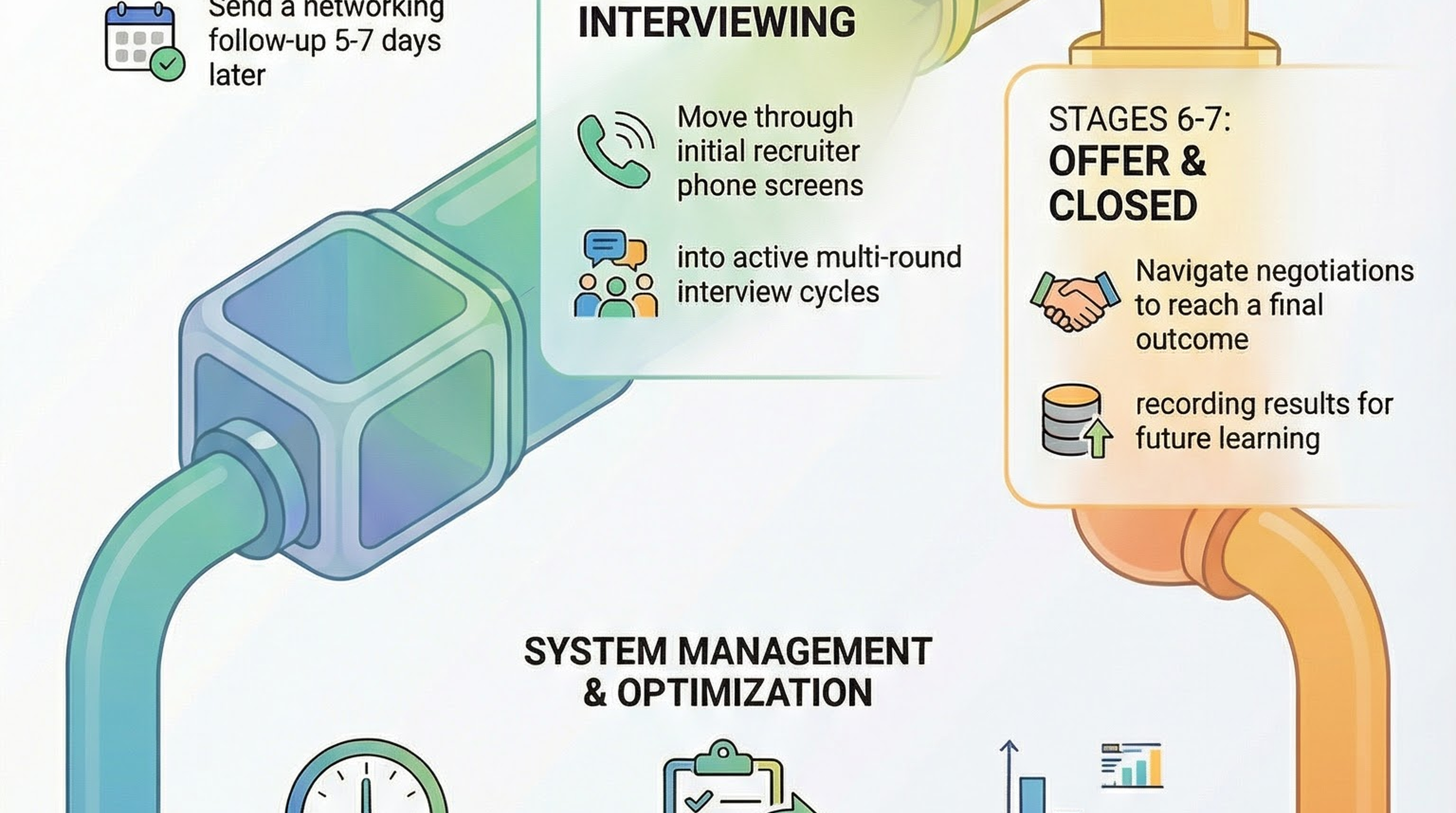
- Follow-Up Sent: Initiated a networking or recruiter reach-out 5–7 days after the initial application.
- Screening: Scheduled or completed the initial phone screen or recruiter qualifying call.
- Interviewing: Actively participating in the interview process, including first, second, or final rounds.
- Offer/Negotiation: Received a formal offer and currently engaged in active discussions regarding terms.
- Closed: Process finalized via acceptance, decline, or rejection, with the outcome recorded for future optimization and pattern analysis.
Building Your Command Center: Essential Tracking Fields
The tool you choose—Google Sheets, Notion, or Airtable—is secondary to the rigor of the data you collect. To eliminate "funnel leakage," your system must prioritize momentum-driving fields.
| Field Name | Strategic Purpose |
|---|---|
| Company | Identifies target organizations to track industry clusters. |
| Role | Specifies the job title and seniority level. |
| Date Applied | Establishes the timeline for follow-up triggers. |
| Source | Identifies high-conversion channels (e.g., LinkedIn vs. Referral). |
| Contact | Lists the specific recruiter or hiring manager for direct outreach. |
| Pipeline Stage | Tracks the current status within the 7-stage funnel. |
| Next Action | Defines the specific, high-leverage step required to move the lead forward. |
| Next Action Date | Establishes a hard deadline to prevent application stagnation. |
| Notes | Records interview observations, culture cues, and key details. |
| Outcome | Captures the final result and data points for strategic pattern analysis. |
The Sunday Evening Routine: Your 15-Minute Strategy Session
Consistency is the engine of optimization. Dedicate exactly 15 minutes every Sunday evening to a high-level pipeline audit. This routine keeps you proactive rather than reactive:
- Update All Stages: Move applications forward or close out those that have reached a final outcome.
- Identify Overdue Follow-Ups: Flag any application that has been sitting for 10 days without outreach. This is your "Red Alert" signal that a lead is stalling.
- Plan the Coming Week: Set specific targets for new researched roles and tailored submissions for the next five days.
- Review Rejection Patterns: Analyze your "Closed" roles to identify why you are losing leads and adjust your strategy accordingly.
Using Data to Debug Your Job Search
Tracking provides objective metrics that reveal "rejection patterns" that feelings and intuition cannot identify. Treat this as a diagnostic audit to identify and clear the bottlenecks choking your conversion rate.
Diagnostic Analysis:
- Rejections at the Screening Stage: Your resume is performing its job (getting attention), but your phone screen skills or initial value proposition are the bottlenecks.
- Rejections After Final Rounds: You are a highly qualified candidate on paper, but you likely need specific interview coaching to outperform the final-stage competition.
The Pipeline Health Check: To ensure a high-performing search, audit your tracker against these target metrics:
- Research Depth: 5–7 applications currently being vetted.
- Submission Volume: 3–5 tailored applications submitted per week.
- Response Rate: Target a 30%+ conversion rate from "Applied" to "Screening."
- Follow-Up Rigor: 100% of applications older than 7 days must have a follow-up outreach recorded.
- Interview Velocity: Maintaining 1 or more active interview processes at all times.
Boosting Efficiency with AI Tooling
To maintain your Command Center without getting bogged down in the "administrative tax" of data entry, leverage AI tools to support your Sunday Routine:
- Pipeline Analyzer: Evaluates your tracker to identify exactly where your conversion rate is dropping.
- Follow-Up Scheduler: Drafts outreach messages and automates the timing for your 5–7 day follow-up window.
- Rejection Pattern Identifier: Aggregates feedback from "Closed" roles to pinpoint strategic weaknesses in your interview or resume style.
- Weekly Review Assistant: Acts as your strategic partner during the Sunday Routine by summarizing progress and highlighting the highest-leverage actions for the coming week.
Conclusion: Your Job Search is Your Strategy
A tracking system is not a passive list; it is your job search strategy. By implementing a CRM-style approach, you gain the visibility necessary to diagnose failures and scale successes. Data reveals the patterns that lead to offers.
💥 Engagement Zone
🎬 Real Story: "Leaky Pipeline" Laura. Laura was a prolific applier—100 roles in one month. But she didn't track them. When a Tier 1 tech recruiter reached out, Laura forgot she'd already spoken to another recruiter at that same firm. The resulting confusion made her look unprofessional, and she lost a $120k offer because she missed a critical follow-up email in her cluttered inbox.
😂 Humor Touch: Treat your job search like a needy digital pet from the 90s. If you don't "feed" it updates and "clean" your pipeline every Sunday, it will eventually wither away into a pile of ghosted applications. A messy tracker is just a graveyard for your career dreams.
🎮 Gamification: The Ghostbuster Challenge. Open your tracker right now. Identify three companies that haven't responded in over 7 days. Send a polite "checking in" email to all three in the next 15 minutes. It's time to bust some ghosts!
📊 Self-Assessment: Rate your "Command Center Readiness" on a scale of 1-5:
- My "system" is my memory and a few scattered emails (The Chaos Zone).
- I have a list of companies, but no dates or "Next Actions."
- I track my applications, but I consistently forget to follow up.
- I use a CRM-style tracker and perform a weekly Sunday audit.
- I am a pipeline pilot. I know exactly where every lead stands and never miss a beat.
Quick Start Checklist
- Choose a tool: Select Google Sheets, Notion, or Airtable.
- Migrate current applications: Input every active role into the 7-stage framework.
- Schedule the first Sunday review: Block 15 minutes to audit your pipeline.
- Use data to adjust your strategy: Identify your primary bottleneck and address it this week.
Accessibility — Image descriptions
| File | Alt text |
|---|---|
GHFE-M05-L04-ENG-application-pipeline-infographic-landscape.png | Infographic for “Blog Post”: visual summary of blog post (landscape layout, GHFE course). |
GHFE-M05-L04-ENG-application-pipeline-infographic-portrait.png | Infographic for “Blog Post”: visual summary of blog post (portrait layout, GHFE course). |
GHFE-M05-L04-ENG-application-pipeline-video-thumbnail-landscape.png | Video thumbnail for “Blog Post”: preview image for the lesson video (landscape format). |
GHFE-M05-L04-ENG-application-pipeline-video-thumbnail-portrait.png | Video thumbnail for “Blog Post”: preview image for the lesson video (portrait format). |