Cracking the Code: How to Beat the ATS and Get Your Resume Seen by Humans
Outcome: By the end of this lesson, you will be able to optimize your applications for Applicant Tracking Systems using the Mirror Technique.
The Hook: Why Your "Perfect" Resume is Failing
Here’s something that might frustrate you, but it needs to be said: I see brilliant candidates every day who have crafted what they believe are "perfect" resumes—documents filled with compelling stories, quantified achievements, and beautiful, modern designs. Yet, they receive nothing but silence.
The reason for this is rarely a lack of talent. Instead, these candidates are falling victim to the "digital void." Before a human recruiter ever lays eyes on your application, it must pass through an Applicant Tracking System (ATS). These AI-powered gatekeepers are designed to scan, parse, and rank your data. If you don't understand the machine's rules, your resume won't just be "pushed aside"—it will effectively cease to exist. The result: the vast majority of resumes are filtered out by an ATS and never reach a human reviewer. Understanding these systems is the fundamental difference between landing on a desk or being filed away by an algorithm.
How the Robot Reads: The ATS Workflow
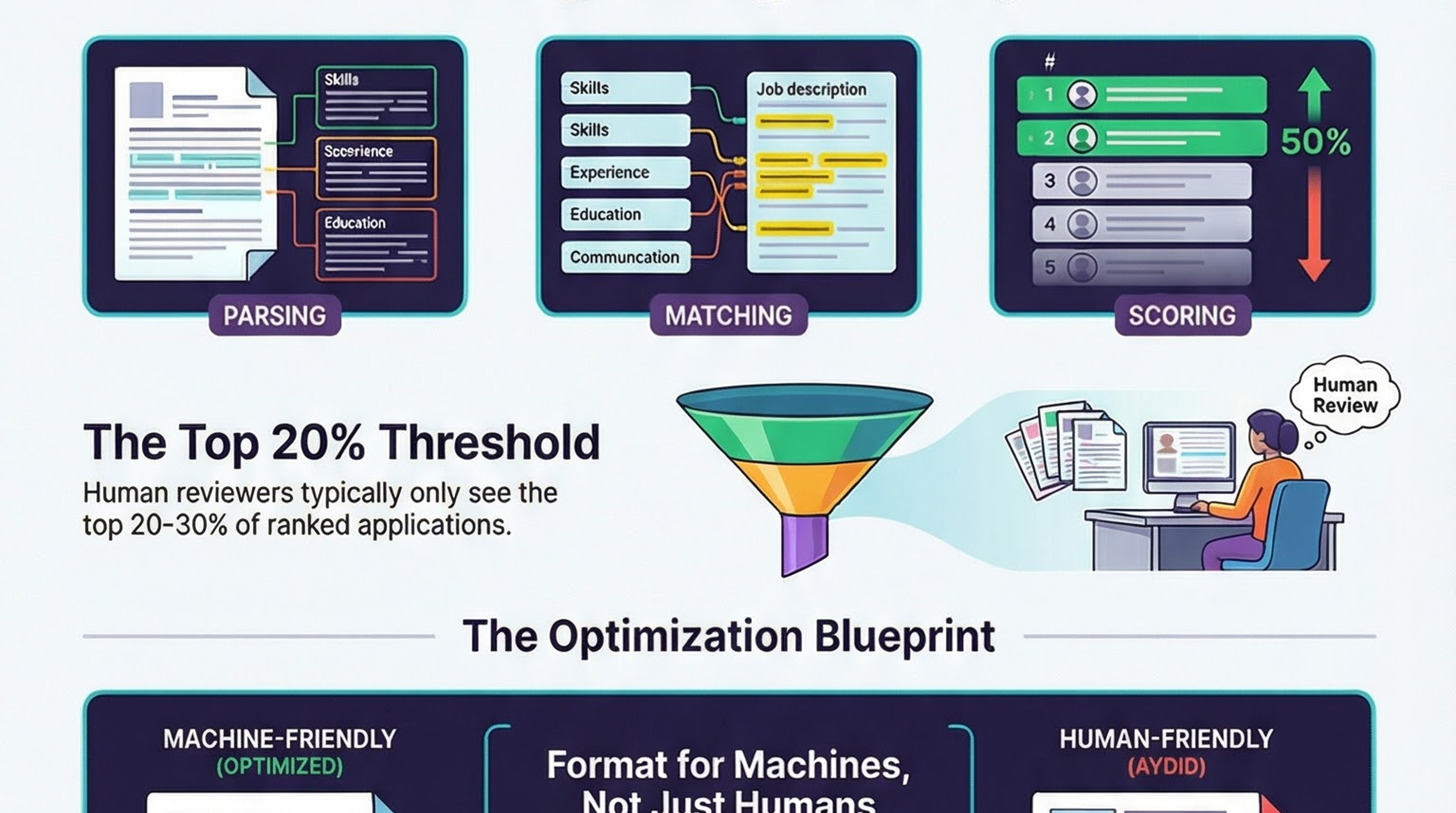
An ATS does not "read" a resume the way a person does. While a human recruiter looks for narrative, potential, and "culture fit," the ATS treats your resume as a set of data points to be organized into structured fields. The process follows a strict four-step workflow:
- Parsing: The system extracts text and attempts to bucket it into categories (Name, Contact, Experience, Education, Skills, Summary).
- Matching: Your parsed data is compared against the specific requirements and keywords found in the job posting.
- Scoring: The system assigns a relevance score based on how well your qualifications match the "ideal" profile programmed by the recruiter.
- Ranking: This is the high-stakes final step. The system ranks all applicants by their score. Because human reviewers typically only interact with the top slice of ranked applications, failing to optimize for the machine means you are among those filtered out before the first human glance.
Design vs. Deliverability: The Formatting Rules
The biggest mistake I see high-level professionals make is choosing "creative" design over technical deliverability. You might love that two-column layout with a sidebar for your skills, but to an ATS, it’s a nightmare. The system reads across the page from left to right; it will merge your sidebar text with your main experience bullets, creating a string of "gibberish" that the machine cannot categorize.
To ensure your information is readable, follow this formatting audit:
The ATS Formatting Audit
| Must-Have Element | Why It Matters/What to Avoid |
|---|---|
| Single-Column Layout | Multi-column layouts scramble the parsing order. The machine reads across the page, merging unrelated sentences into unreadable data. |
| Standard Section Headers | Use "Summary," "Experience," "Education," and "Skills." Avoid creative titles like "Where I've Been" or "My Impact," as the ATS may not recognize where a section begins or ends. |
| Consistent Date Formats | Inconsistent dates are a primary cause of parsing errors. Use a standard format (e.g., MM/YYYY or Month YYYY) throughout the entire document. |
| Standard Fonts | Stick to Arial, Calibri, or Times New Roman. These ensure the text remains legible after the system converts your file into plain text. |
| Safer File Types | Save your resume as a .docx file. While .pdf is often accepted, .docx is the safer and most reliably parsed format for the widest variety of systems. |
| Body-Text Contact Info | Never put your phone number or email in a header or footer. Many systems ignore these areas entirely, leaving the recruiter with no way to contact you. |
| No Visual Elements | Avoid text boxes, tables, images, or icons. Specifically, avoid "skills bar charts"—these are invisible to the machine and will not contribute to your score. |
Mastering the Keyword Strategy: Mirror, Don't Stuff
Keywords are the currency of the ATS. However, the old tactic of "keyword stuffing" (listing a block of words in white text at the bottom) no longer works. Modern systems look for context. I recommend a two-pronged approach:
1. The "Mirror" Technique
You must extract the exact terms used in the job posting and incorporate them naturally. If a posting asks for "Project Management," do not write "managed projects." The machine is looking for a literal match.
2. Natural Integration
Keywords must appear within the context of your "Experience" bullets. The ATS validates your skills by seeing them linked to your professional history. Additionally, create a dedicated "Skills" or "Core Competencies" section that mirrors the job posting's terminology directly to ensure those terms are captured during the parsing phase.
Pro Tip (Abbreviations): Always include both the full term and the abbreviation to maximize hits. For example, write: "Search Engine Optimization (SEO)." This ensures you are found regardless of which variation the recruiter enters into the search bar.
Leveraging AI Tools for an Edge
While the ATS uses AI to filter you, you should use AI to fight back. These tools help you maintain a natural, human tone while ensuring you hit the technical benchmarks required by the machine:
- ATS Keyword Extractor: Scans job postings to identify the high-priority terms the system will be looking for.
- Resume ATS Optimizer: Suggests specific content adjustments to align your profile with a specific job description.
- Keyword Integration Writer: Helps rewrite your experience bullets to include keywords naturally, ensuring the resume still sounds professional to the human recruiter who eventually reads it.
- ATS Score Predictor: Simulates the scoring process to provide an estimate of how you will rank, allowing you to iterate before you hit submit.
💥 Engagement Zone
🎬 Real Story: "ATS-Proof" Alex. Alex had a stellar 10-year career but was getting zero callbacks. He realized his "creative" two-column resume was being mangled by the ATS. After switching to a boring, single-column, standard-header layout, he landed 3 interviews in his first week. The machine didn't hate him; it just couldn't read him.
😂 Humor Touch: Think of the ATS as a very grumpy, very literal librarian who only speaks in keywords. If you walk in with a resume full of "artistic" graphics and non-standard fonts, it’s like trying to check out a book by doing an interpretive dance. They don't care about your vibe; they just want the ISBN.
🎮 Gamification: The 60-Second Keyword Scan. Set a timer for 60 seconds. Scan your current resume and highlight every keyword that appears in the job description. If you can't find at least 10 matches in a minute, the robot definitely won't find you at all. Go!
📊 Self-Assessment: Rate your "Robot Friendliness" on a scale of 1-5:
- I use two columns, images, and "soft skill" progress bars (Danger Zone).
- I have standard headers but still use a non-standard date format.
- I use standard formatting but haven't tailored my keywords yet.
- My layout is clean, single-column, and I mirror 70% of the job description keywords.
- I am a machine-whisperer. My resume is optimized for parsing and human readability.
Conclusion: Your 5-Point ATS Success Checklist
The rules of the ATS are strict, but they are straightforward once you stop designing for humans and start building for the machine first. Use this final checklist before every application:
- Simplify the Layout: Use a clean, single-column design with no graphics, charts, or text boxes.
- Standardize Your Data: Use standard headers (Summary, Experience, Education, Skills) and consistent date formats.
- Mirror the Language: Use the exact terminology from the job description.
- Cover All Variations: Include both abbreviations and full-length terms for all technical skills.
- Tailor Every Time: A static, one-size-fits-all resume will consistently receive lower scores. Tailor your keywords and experience for every specific posting.
Final Action Item: The Resume Audit
Perform a manual audit of your current resume against the ATS Formatting Audit table above. If your "Pass" rate is below 80%, stop applying. Reformat your document immediately to ensure you aren't being silenced by the gatekeeper. Once you understand the rules, you can stop shouting into the void and start getting seen.
Accessibility — Image descriptions
| File | Alt text |
|---|---|
GHFE-M05-L03-ENG-beating-the-ats-infographic-landscape.png | Infographic for “Cracking the Code: How to Beat the ATS and Get Your Resume Seen by Humans”: visual summary of ATS resume optimization (landscape layout, GHFE course). |
GHFE-M05-L03-ENG-beating-the-ats-infographic-portrait.png | Infographic for “Cracking the Code: How to Beat the ATS and Get Your Resume Seen by Humans”: visual summary of ATS resume optimization (portrait layout, GHFE course). |
GHFE-M05-L03-ENG-beating-the-ats-video-thumbnail-landscape.png | Video thumbnail for “Cracking the Code: How to Beat the ATS and Get Your Resume Seen by Humans”: preview image for the lesson video (landscape format). |
GHFE-M05-L03-ENG-beating-the-ats-video-thumbnail-portrait.png | Video thumbnail for “Cracking the Code: How to Beat the ATS and Get Your Resume Seen by Humans”: preview image for the lesson video (portrait format). |